
Building a Smarter Way to Manage Estates and Pay Bills
project image

Role

Sole Product Designer

Timeline

Feb 2025 - Jul 2025

Industry

Fintech
Estate management in Nigeria has long depended on manual processes. Payments are collected through cash, bank transfers, and WhatsApp messages, leaving both residents and administrators struggling to stay organized. KoboSmart was designed to close this gap. It brings together bill payments, community management, and accountability into one digital platform.When I joined the project, my role was to lead the design for the entire product from concept to high-fidelity execution. I was responsible for shaping the resident experience, building admin tools, designing security interactions, and architecting the super admin web dashboard. The goal was to: design a unified platform that simplifies life for everyone in the estate ecosystem, residents, estate admins, security teams, and platform administrators.project image
Business Goal: Simplifying Estate and Utility Payments in Nigeria
The goal was to digitize the fragmented process of estate payments in Nigeria and to simplify how communities interact with utilities. The product needed to serve two audiences: everyday users managing personal bills and estate administrators handling collective payments for services like security, waste, water, and electricity. KoboSmart would reduce administrative errors, speed up settlements, and improve transparency between residents, admins, and security teams.
Market Size & Growth
Nigeria’s urban estate communities are expanding fast. According to market data, more than 2.5 million households now live in structured residential estates. Yet, most of these communities still rely on manual payment methods. This gap represents a growing market for digital estate tools. With rising smartphone adoption, KoboSmart could become the standard for community-based digital finance.
Forecast & Strategy
Our forecast focused on steady adoption within gated communities and private estates. The strategy was first to build trust by making bill management seamless for residents. Then empower estate admins with tools that feel professional but not intimidating. This approach positioned KoboSmart as more than a payment app. It became a digital companion for modern estates.
Project Goal
My role as lead designer was to shape how people experienced this product. I needed to translate administrative complexity into simple, guided workflows. The goal was to design a mobile-first experience for residents and admins, supported by a responsive web system for super admins and non-resident users paying public bills.
Research
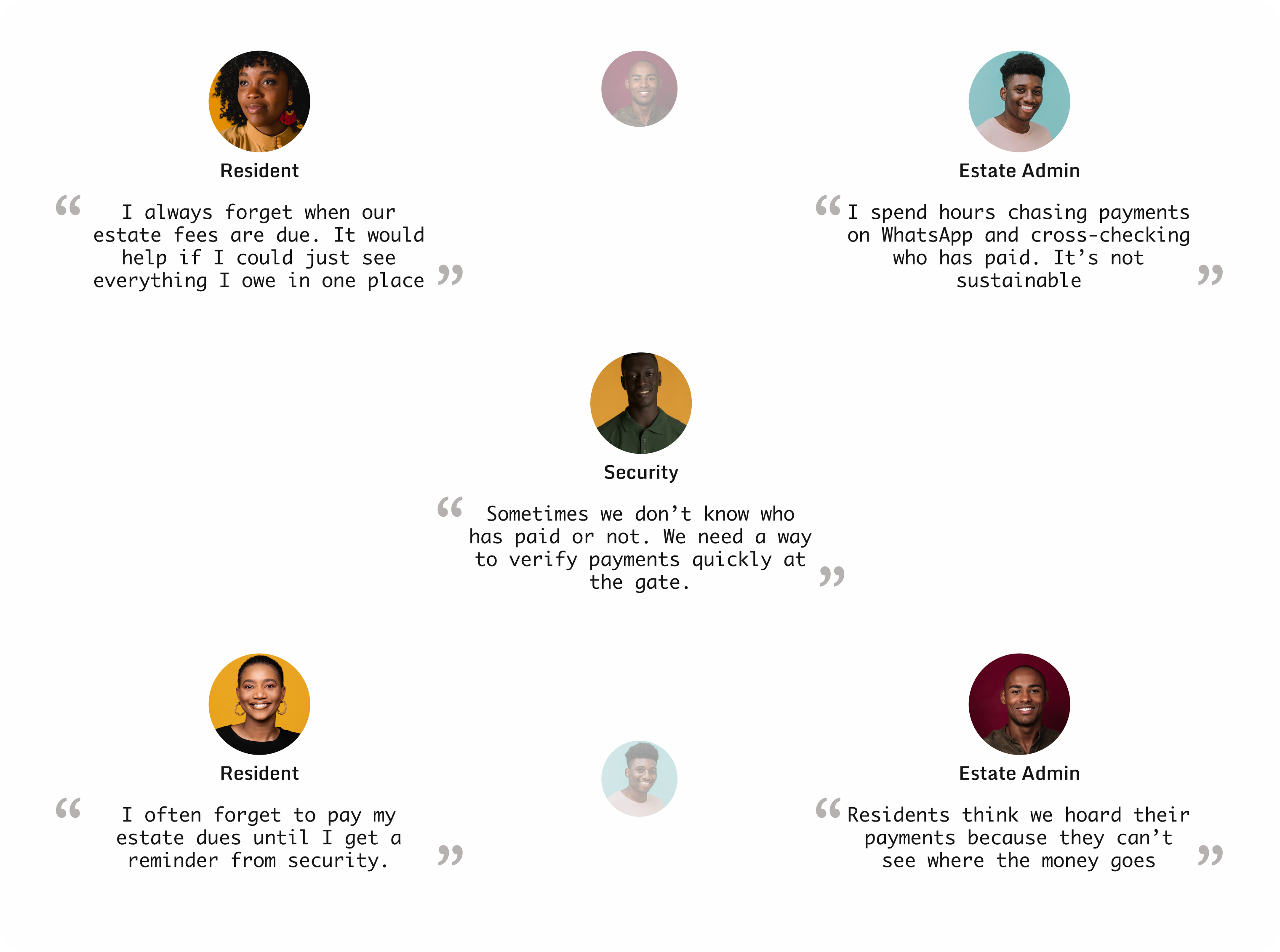
We began with contextual interviews in five estates across Lagos. We observed how residents tracked payments and how admins managed records. Most used a combination of receipts, phone notes, and WhatsApp groups. Security teams confirmed that visitor verification was verbal, based on recognition, and prone to error.This discovery shaped our guiding question:
“How can we simplify estate payments without disrupting existing trust structures?”
research
Competitive Analysis
When we compared KoboSmart with similar platforms like Sesa and Clannit, it became clear that while these products aim to simplify estate living, they often introduce unnecessary complexity for users. Their platforms require multiple steps to perform basic actions such as bill payments, guest approvals, or dues tracking. Many users find themselves switching between apps, dashboards, or even manual confirmations to complete simple estate-related tasks.KoboSmart sets itself apart by taking a holistic approach. It merges financial management, estate operations, and community coordination into a single, easy-to-use experience. Instead of separating payments, guest management, and security, KoboSmart unites these interactions under one flow, making estate management both efficient and transparent.
Key Findings
  1. User Experience Gaps: Most competitor platforms focus heavily on functionality without considering how intuitive navigation should feel. Users often have to click through several screens to complete actions that should take seconds. KoboSmart bridges this by designing shorter, more predictable flows.
  2. Fragmented Solutions: Sesa excels at communication and dues tracking, while Clannit handles gate access control. However, neither offers a comprehensive solution that manages both finances and community operations in one environment. KoboSmart fills this gap by providing a unified ecosystem for all estate-related needs.
  3. Lack of Automation and Transparency: Competing platforms rely on manual updates or external confirmation steps for dues and settlements. KoboSmart automates recurring payments, ledger updates, and settlements, which improves accountability between residents and admins.
  4. Security and Role Limitations: Clannit focuses mainly on visitor management, while Sesa lacks role differentiation entirely. KoboSmart introduces layered roles: Resident, Admin, Security, and Super Admin, ensuring that each user type sees only what they need, minimizing confusion and maintaining data security.
  5. Unrefined Reporting Systems: Reporting in competitor products is basic or non-existent. KoboSmart’s analytics and settlement features allow estate admins and super admins to understand payment patterns, outstanding balances, and estate performance in real time.
  6. Unrefined Reporting Systems: Reporting in competitor products is basic or non-existent. KoboSmart’s analytics and settlement features allow estate admins and super admins to understand payment patterns, outstanding balances, and estate performance in real time..
Competitor research reinforced a clear design direction: simplicity, integration, and clarity must drive KoboSmart’s product experience. The market needed an estate management tool that doesn’t just function, it has to feel effortless to use. KoboSmart’s approach was to make estate life easier, not more complicated.
User Stories
After gathering insights from user interviews and analyzing estate management behaviours, we defined the key personas that shaped the KoboSmart experience. Each user type (residents, estate admins, and security) interacts with the system differently, so their stories helped us translate needs into actionable design features. These narratives guided decisions on navigation, hierarchy, and workflow, ensuring every screen supported a real goal.

User Story

As a resident, I want to view and pay my estate bills easily, so I can stay compliant without stress.

User Story

As an estate admin, I want to track which residents have paid or are owing, so I can maintain transparency and accountability.

User Story

As a security officer, I want to confirm the payment status of residents, so I can enforce access policies fairly.
Interaction Design & Accessibility
  1. Seamless Navigation: Navigation had to be effortless across mobile and web. I tailored experiences for estate admins, residents, and security officers, focusing on intuitive hierarchies and consistent visual cues to minimize learning time.
  2. Accessibility Standards: KoboSmart's design prioritized accessibility and user confidence, not just aesthetics. I adhered strictly to WCAG guidelines, ensuring every element, from colour contrast to button placement, reinforced the principle that clarity builds trust.
  3. Security Features: Security and privacy were central. Features like BVN/NIN verification, encrypted transactions, and consent modals were seamlessly integrated. The design ensured users always understood data usage, reinforcing trust in the system.
  4. Business-Centric Design: The design philosophy was business-centric, balancing functionality with financial responsibility. The interface allowed admins to clearly monitor settlements, track bills, and analyze collections, prioritizing operational efficiency.
Through iterative refinement and tester feedback, KoboSmart evolved into a platform that not only performs well but also feels intuitive for first-time users, efficient for returning users, and compliant with global accessibility standards.
Ideation & Prioritization
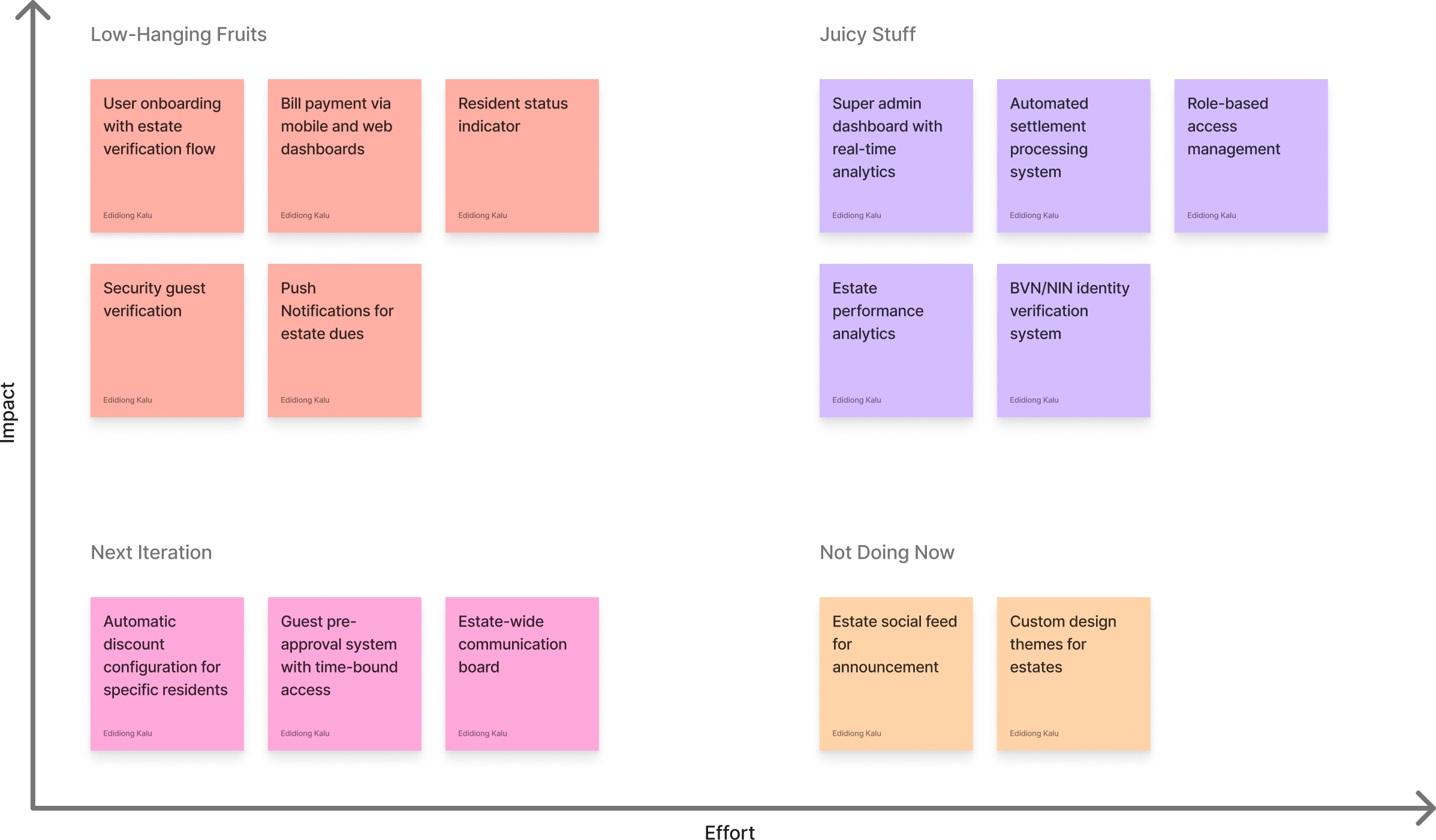
After consolidating the findings from our user research, the next challenge was figuring out what to build first. KoboSmart had the potential to serve many user types (residents, estate administrators, security officers, and super admins) each with their own needs. To avoid spreading efforts too thin, the product team and I organized a design workshop to brainstorm features that aligned with both user pain points and business goals.We began by mapping out every idea on a whiteboard. Nothing was off-limits at this stage. Some suggestions focused on streamlining bill payments for residents, others explored data analytics for estate admins, while a few revolved around community-driven features like guest access and maintenance requests. Once we had all ideas visible, we needed a framework to bring structure to this creative chaos.
research
Overcoming Constraints
  1. Team Alignment: One of the biggest challenges was maintaining alignment across a distributed team of designers, developers, and business stakeholders. Everyone had different priorities, and bringing those perspectives together required frequent communication and collaboration. It was not enough to simply share designs. We had to ensure that each decision reflected both user needs and technical realities.
  2. Role Consistency: Residents, estate admins, and security users all interacted with the app differently, yet the experience needed to feel consistent. We approached this by defining clear interaction boundaries for each group. Residents focused on payments and community updates, security users handled verification tasks, and estate admins oversaw analytics and management. Every interface had to feel intuitive on its own while still belonging to the same product ecosystem.
  3. Technical Constraints: Integrating real-time payment systems came with unexpected constraints, especially when certain APIs could not support the desired level of interaction. Instead of compromising the user experience, I collaborated closely with developers to identify alternative workflows that preserved intent and usability.
User Flow
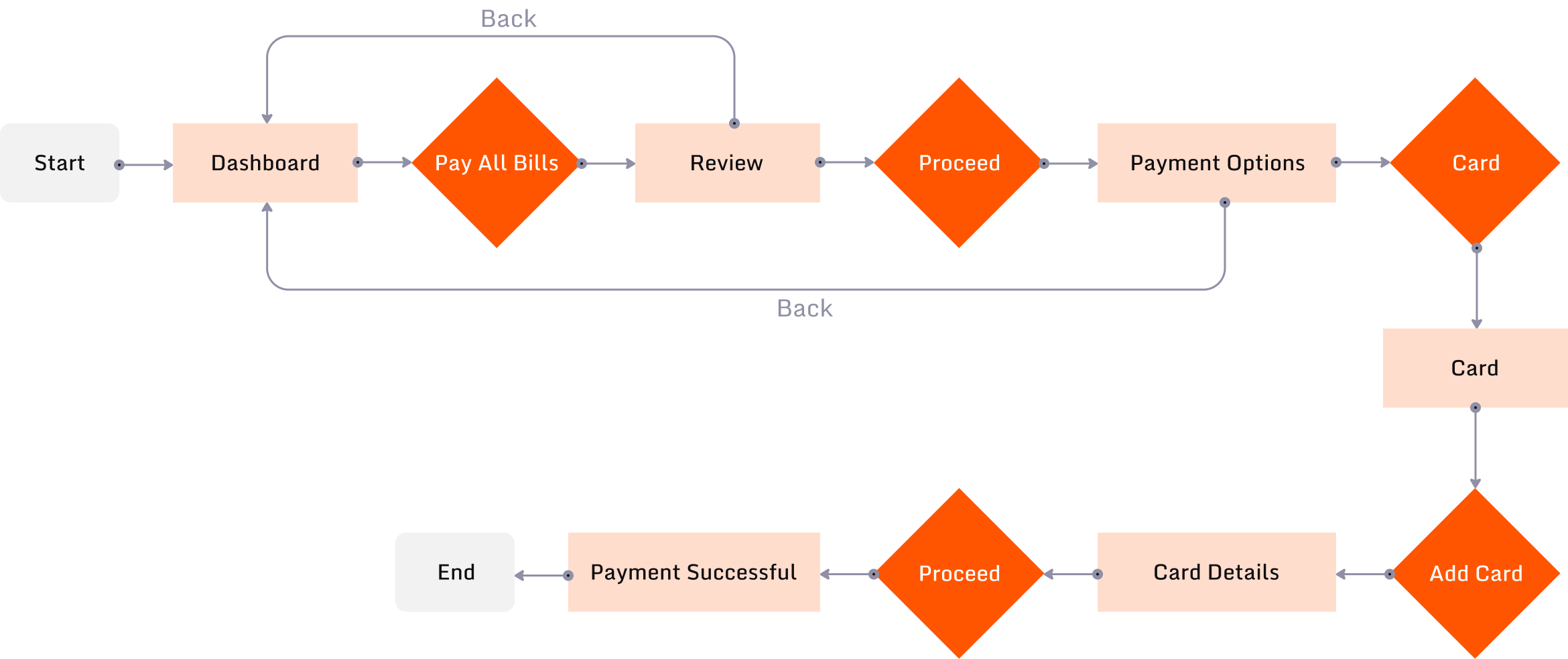
The user flow for residents on KoboSmart was designed around simplicity and efficiency. Paying a bill follows a clear, minimal path and visual feedback reassures users at every stage, while options for recurring payments make managing regular dues effortless.
research
Research to Reality
Right from the start of the design phase, it was clear the mobile experience was everything for KoboSmart. Most residents and estate admins preferred using their phones to manage day-to-day activities like payments, guest passes, and communication. Prioritizing mobile was not just a design choice. It was a reflection of how people live, pay, and interact with their communities.The design approach focused on clarity and accessibility. We aimed to make every interaction smooth, whether a user was viewing a bill or signing up, ultimately building trust and a feeling of simplicity. Each flow was built around real-world actions that users perform daily, tested against scenarios drawn from interviews and mock simulations with early adopters.The result was a cohesive system that connects everyone in an estate: residents, admins, and security.
Onboarding

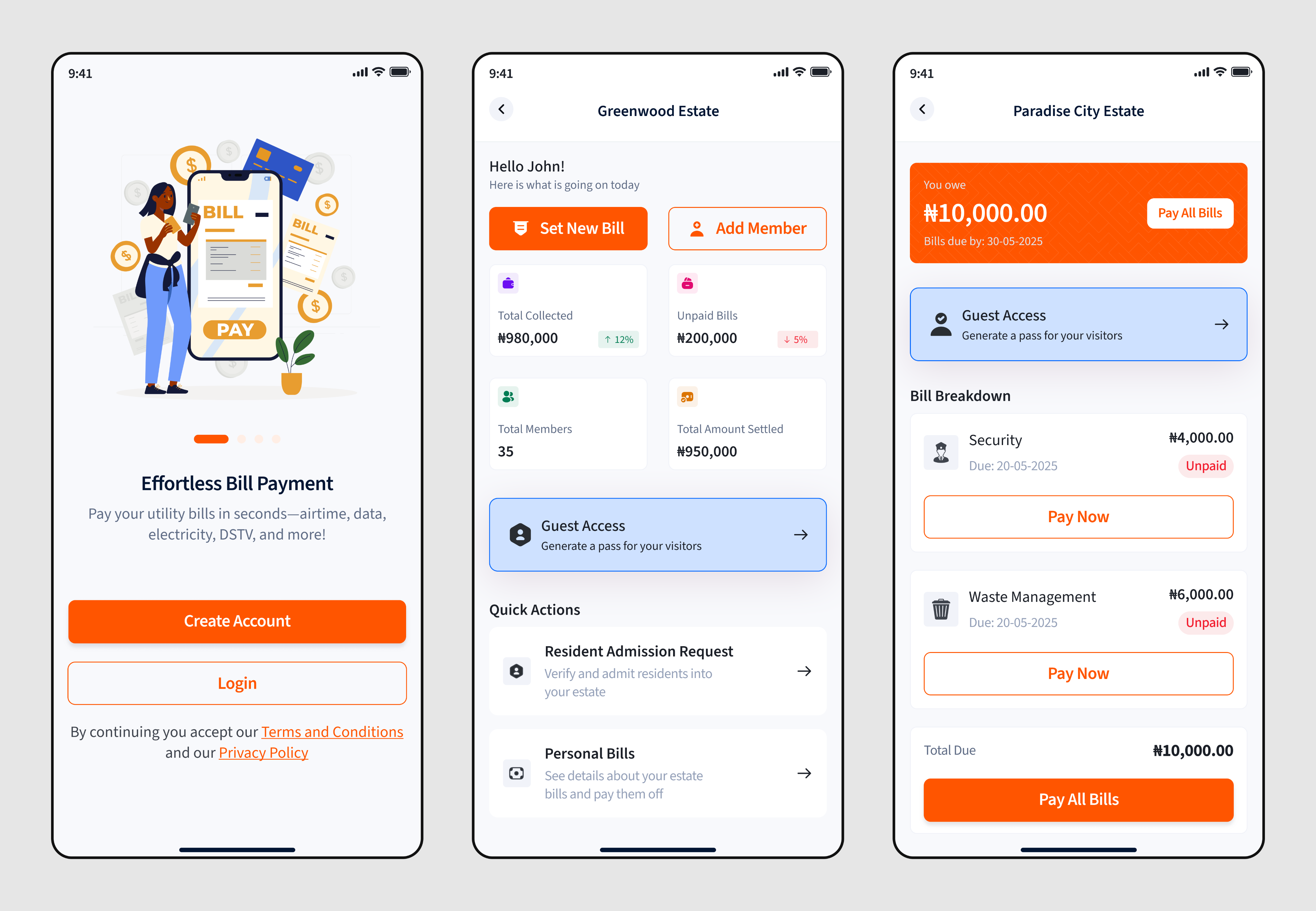
Welcoming Start: A friendly splash screen explains KoboSmart helps you pay bills effortlessly, with clear “Create Account” and “Login” options.

Smooth Registration: Minimal input fields (email and password) with clear password validation and Google sign-in for easy access.

Secure Verification: OTP confirmation ensures user authenticity, with an option to resend the code if needed

Profile Setup: Users add personal details like name, photo, and address to personalize their account and enable estate linking later.

Identity Verification: Users verify their BVN or NIN by matching their full name and date of birth, promoting accuracy and compliance.

Confirmation and Onboarding Complete: A success screen with a unique KoboSmart ID and a single “Go to Dashboard” button finalizes onboarding, reinforcing trust and readiness.
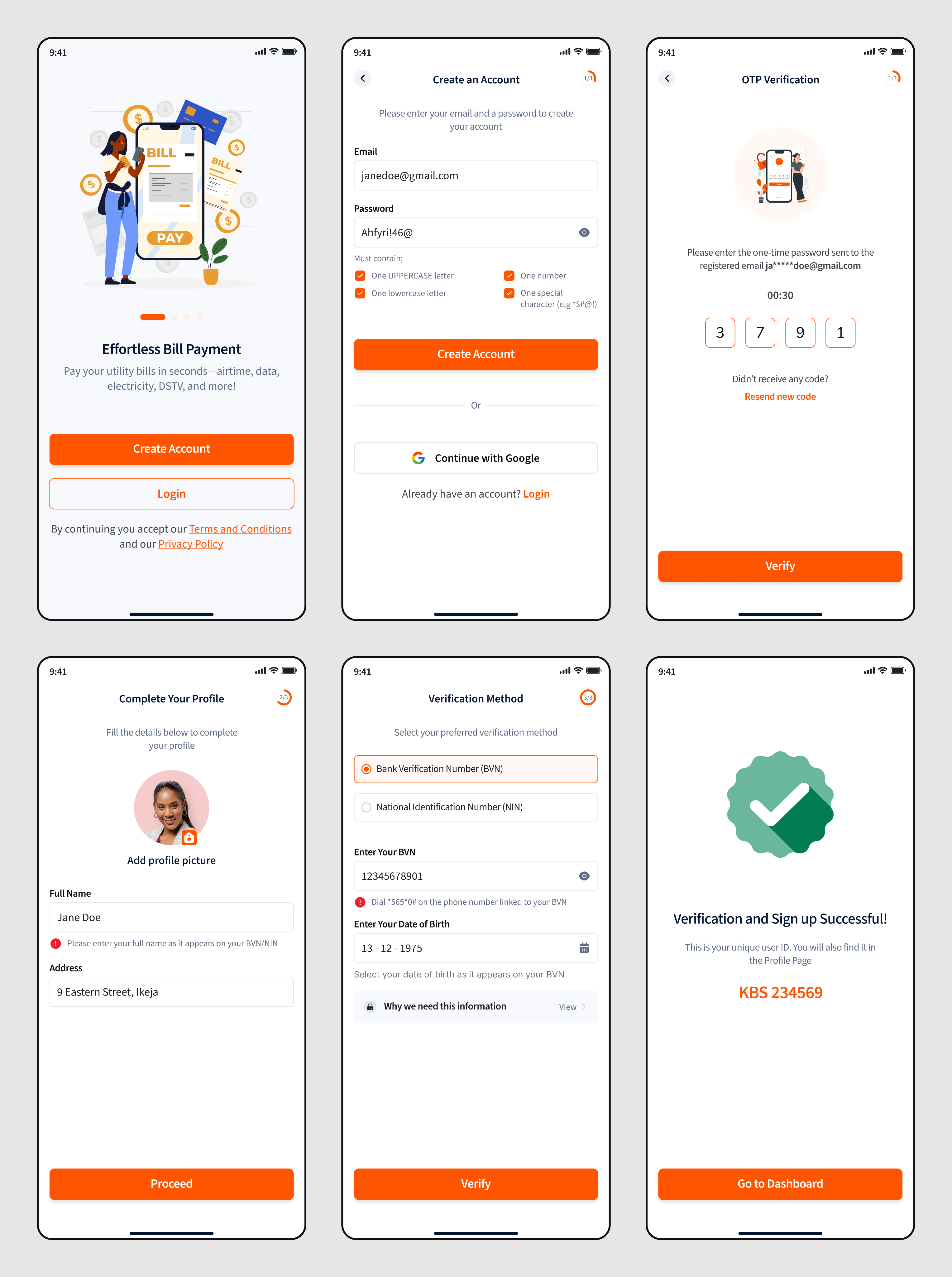
onboarding_screen
Dashboard

Estate Bill Overview: The top section clearly displays the total amount of estate bill owed and due date, with a bold “Pay All Bills” button for quick payment.

Categorized Bill Options: Icons for Airtime, Cable, Data, and Electricity are neatly grouped, with badges like “10% off” to encourage engagement. Upcoming features like Betting and Taxes are marked as “Coming Soon.”

Estate Management: Residents can easily join an existing estate or recommend a new one. The forms for joining capture essential details such as address, building type, and number of bedrooms.

Linking Card for Auto-Pay: Users can link their bank account or debit card to enable automatic payments. A clear verification process is explained, including the one-time ₦100 validation charge and refund.

Seamless Verification Flow: The design builds user trust through step-by-step prompts that confirm successful account linking with friendly visuals and clear feedback.
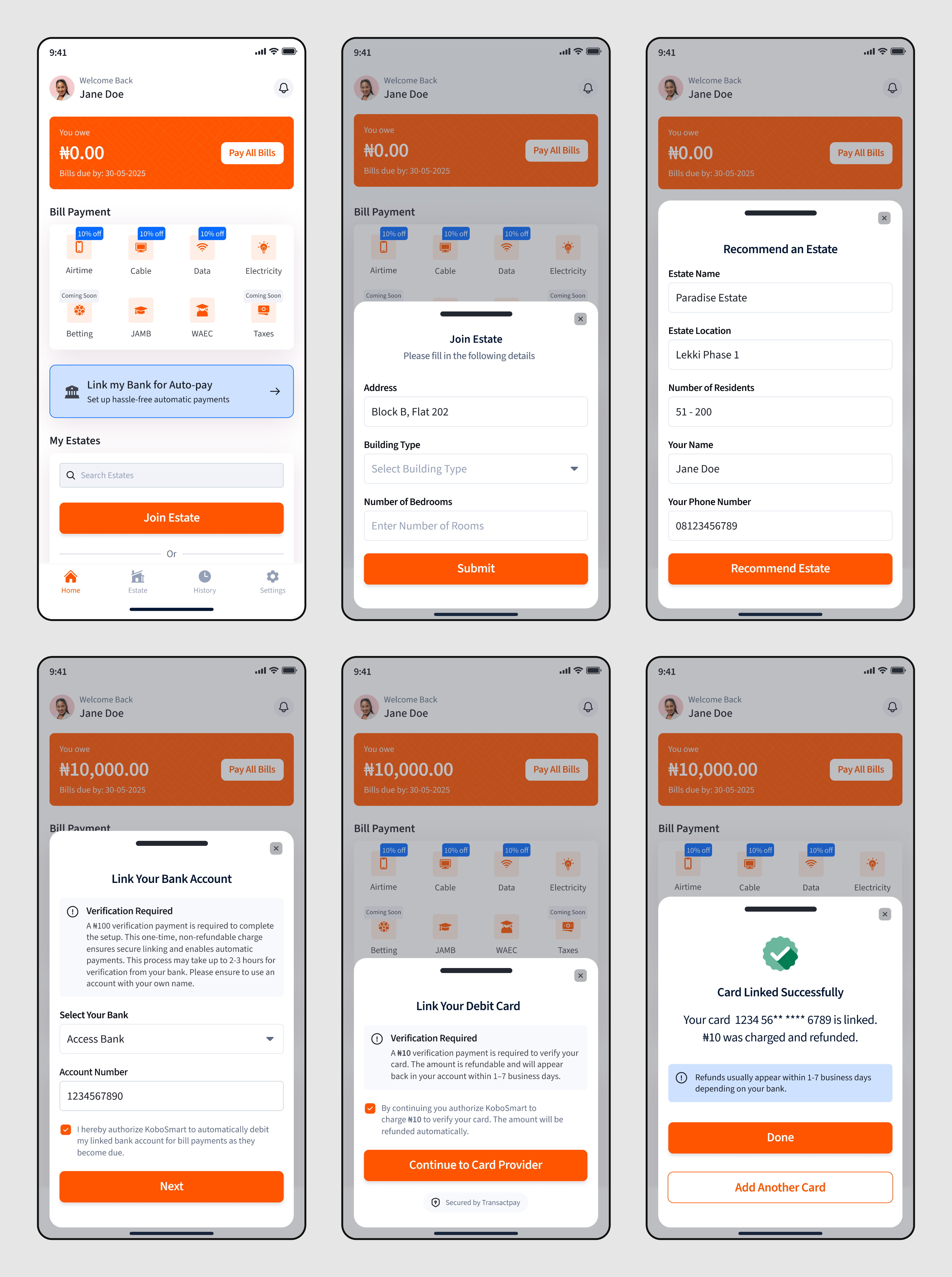
dashboard_screen
Estate

Multi-Estate Management: Residents can belong to multiple estates. The “My Estates” screen allows easy switching between estates, showing at a glance how much is owed and the next due date.

Clear Role Identification: Each estate clearly indicates the user’s role (for example, Member or Admin) ensuring transparency in permissions and accessible features.

Transparent Bill Breakdown: The estate dashboard displays an itemized bill summary (e.g., electricity, waste management) with due dates and payment statuses for each item.

Guest Access Control: Users can generate digital guest passes by entering visitor details (name, email, vehicle plate, visit duration). This improves estate security and visitor tracking.
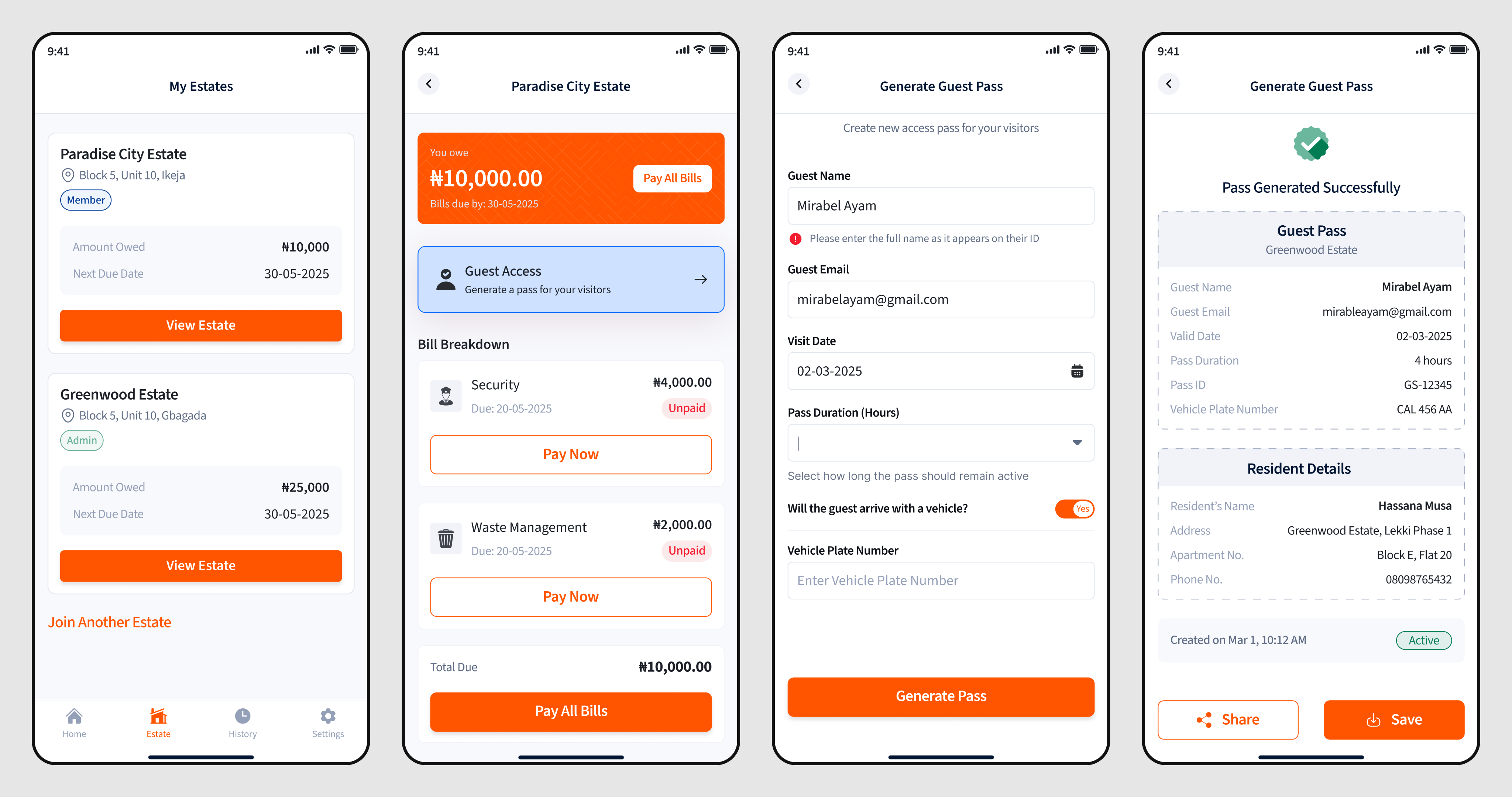
estate
User Testing
After completing the first design iteration, we conducted moderated usability testing with 12 participants (a mix of residents, estate admins, and security personnel) from different housing communities. The goal was to understand how easily users could navigate the app, complete core actions like paying bills, and manage estate activities without confusion.We structured the sessions around five key tasks:
  1. A resident paying an electricity bill and setting up recurring payments.
  2. An estate admin creating a new monthly bill.
  3. A security officer validating a guest pass.
  4. A super admin reviewing estates and approving new admins.
  5. A resident requesting to join an estate through the app.
We conducted the tests remotely via recorded sessions and in-person where possible. Each session lasted about 40 minutes, followed by a short feedback discussion.
Key Findings
  1. Information Hierarchy Mattered: Many users hesitated during the bill payment flow because the amount summary appeared below the payment options. We moved the summary higher up and added a confirmation step that improved clarity.
  2. Positive Feedback on Flow: Across all roles, testers appreciated how the system reflected real estate hierarchies and transactions, saying it felt “easy to use” and “well thought-out.”
Testing validated that our core interaction patterns were solid but revealed areas where microcopy, visual hierarchy, and contextual cues significantly affected user understanding. Iterating on these insights led to a smoother experience that minimized confusion and supported faster task completion.
Business Impact
KoboSmart positioned itself as both a financial and community infrastructure tool. Early testing showed that admins spent 60% less time reconciling payments. Residents reported higher satisfaction due to timely reminders and transparent records. The system’s ledger and settlement modules built trust between estates and KoboSmart’s platform.
Looking Back
Designing KoboSmart was an exercise in translating human behavior into digital systems. It taught me how community habits shape product expectations. What began as a payment app grew into a social layer for how estates operate.

View the website here

Let’s Discuss
edidiongkalu@gmail.com

Project Idea

Project Direction

blue star

© 2026. All rights reserved. Edidiong Kalu.